

Highlights from the second half of the Financial Year
During the second half of FY26, we introduced a range of new enhancements to Assure Expenses, improving functionality across key areas of the system.
Many of these updates were developed directly from customer feedback sessions and suggestions submitted through our Ideas Portal, helping us continue to evolve the product in the areas that matter most to you.
Let’s take a look at what’s new!

Top highlights from Quarter 3 🌟
Driver Compliance Top-up Service
We’ve streamlined the credit top up process for the driver compliance licence lookup service. Email notifications for low credits, insufficient credits, and out-of-credits are all now updated to provide you with information on how to directly top up your credit funding without having to contact your account manager.
By streamlining the process of arranging a top-up this will make it easier for you and will prevent future look-up delays.
Allow driver compliance checks to be specified for individual expense items
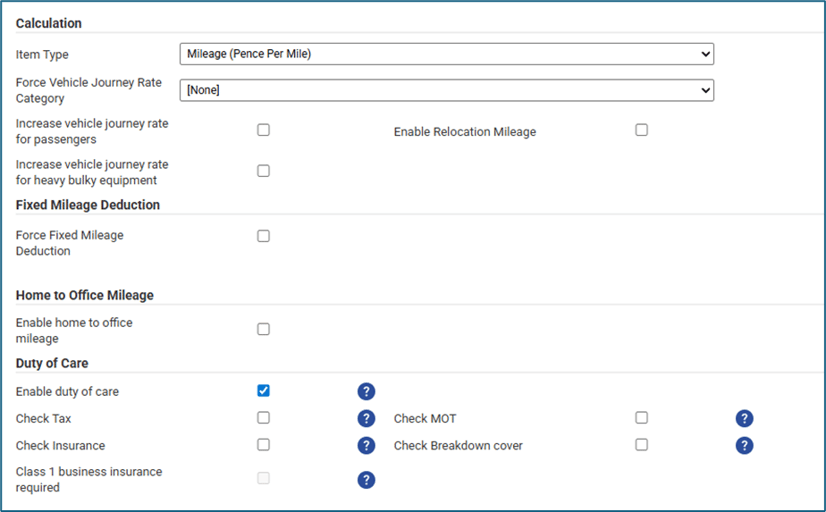
We’ve added a new feature to allow you the option of specifying the driver compliance checks you want to include at expense item configuration level rather than a company wide set of options. This provides a more granular approach to the checking options and more flexibility on how and what checks you want to include in different scenarios.
Different checks can now be made when expenses are claimed against different mileage expense items, and in turn provides an option for excluding company cars from the driver compliance vehicle document checks whilst including all options for employees claiming mileage when using their own private vehicle. An example would be ensuring insurance document checks are completed for private vehicles but excluded for company owned vehicles.
Additional columns to all driver compliance menus for teams
We’ve added additional columns to the Driver Compliance menus for teams to include the employee’s full name so that the individuals can be more easily identified.

Financial year definitions
In line with the data purge featured implemented in the first half of the financial year, we’ve added additional enhancements to the financial year configuration options, because the retention period is based on your financial year details.
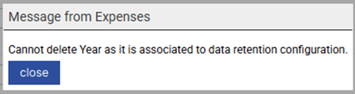
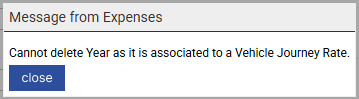
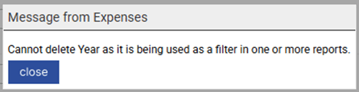
We implemented additional checks to ensure a financial year defined in the system cannot be deleted if you’ve included it in the data retention settings and have extended these checks to vehicle journey rates and report filtering options.
This ensures that wherever a financial year is defined in another area of the system, deletion of the record that would cause an issue in another area is prevented.
Updates to the claim approval page display for teams
We updated our Check and Pay expenses options to cater for scenarios where an extraordinarily large number of claims are awaiting approval by a team. We’ve improved the way the system displays all the claims to members of the team so that a member of the team can choose a claim to approve. This has made the display more performant for the team, since they no longer have to wait for the entire page to load before selecting a claim from the team list.

Updates to ensure the main administrator is set
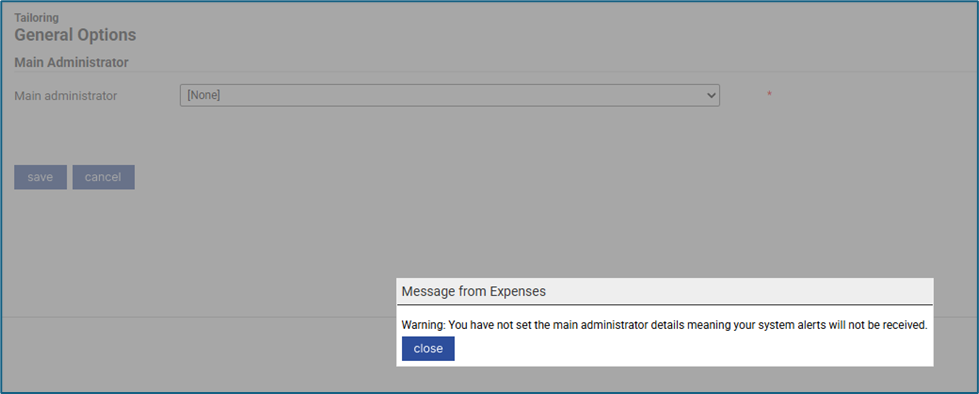
We’ve added new validation when saving General Details that will prevent the saving of the General Options until the main administrator details are provided.
Now, if the Main Administrator field is empty, a warning message will display, “You have not set the main administrator details, meaning your system alerts will not be received.” This change will ensure that notifications sent from Expenses or Driver Compliance that are intended for the main system administrator will always have a recipient.

Implemented excess mileage options for the mobile app
We’ve implemented new options for claiming excess mileage via the mobile app, bringing the options in line with claiming excess mileage via the web version of Expenses. We added an 'Allowance' checkbox and the 'How many miles did you complete' field displays as read-only on the Relocation Mileage expense item and added 'Claim Fixed Excess Mileage' checkbox and ‘How many miles did you complete' field displays as read-only on Fixed Excess Mileage expense item.
This provides improved handling of specific mileage expense types such as Relocation Mileage and Fixed Excess Mileage. We've also made enhancements to the Mobile App for improved user flow and handling of specific expense types such as: Relocation Mileage, Fixed Excess Mileage and Fixed Allowances.
Observability
We’ve moved our observability to a new Honeycomb platform for Expenses web and to a new Sentry platform for the Expenses mobile App. We’ve also implemented additional tracing across the mobile app. In addition, we’ve implemented further tracing in additional key areas of the product and changed all our previous logging to tracing.

Top highlights from Quarter 4 🌟
Over the course for Q4 (Feb 2026 to Apr 2026) we added some exciting new features and enhancements to Assure Expenses that came from your user ideas and suggestions.
The following new features and enhancements are now available:
Updated colour branding for Expenses Mobile and the API documentation
The Expenses mobile app and the API documentation have been updated to align with RLDatix branding. The primary colour has been changed from blue to the RLDatix teal colour palette, ensuring a more consistent look and feel across all your RLDatix systems.
Updated address lookup service for international addresses
We've enhanced journey steps to include premise level details from Addressy for international addresses, for GPS-captured locations, with full backward compatibility and support for manual edits.
Streamlined the Expedite receipt validation checking service
We've made updates to the Expedite receipt validation checking service to streamline the processes. These changes allow receipts to be validated more easily and quickly, meaning you will receive the results in a timely manner, and reduces the likelihood of a service SLA breach.
New driver compliance history log for driver licence lookup credit usage
For Expenses systems where the Duty of Care module is enables with automatic lookup of DVLA driving licences, we’ve added a new history log for administrators to show the use of the lookup credits.


This new log will give instant access to credit usage information, showing each time a credit has been used and for what reason. The log also records the number of credits remaining, allowing you the opportunity to make an ad-hoc top-up if you find you are running low. The history log in the system means that system administrators will no longer need to raise a support ticket to find out the number of credits they have remaining from their original allocation.
The log can be found in the Imports/Exports section of Administrative Settings, and access to the log is controlled with user access role permissions.
Improved the process for failed driver compliance documents
We’ve updated the Driver Compliance for documents that fail a review and are sent back to the driver. Now the driver will be notified of the failed review, along with the reason, and can make the necessary updates to the existing record that will be automatically sent back for further review.
Previously the driver would need to start a new record.
Extended data purge options for GDPR data retention rules to include corporate card transactions
In the first half of the year, we provided you with new tools to remove data after the required HMRC audit period to support compliance and data minimisation.
We added a set of new features allowing you to automatically remove information from Expenses after the regulatory period required by HMRC to maintain it for audit purposes, so that you are not retaining the information for longer than is necessary. We’ve now expanding the data purge options from employees, claims, and Driver Compliance records to additionally include Corporate Card Transactions. Your account must be enabled for automatic data removal in order to access this new set of features.
Configuration of automatic data removal options
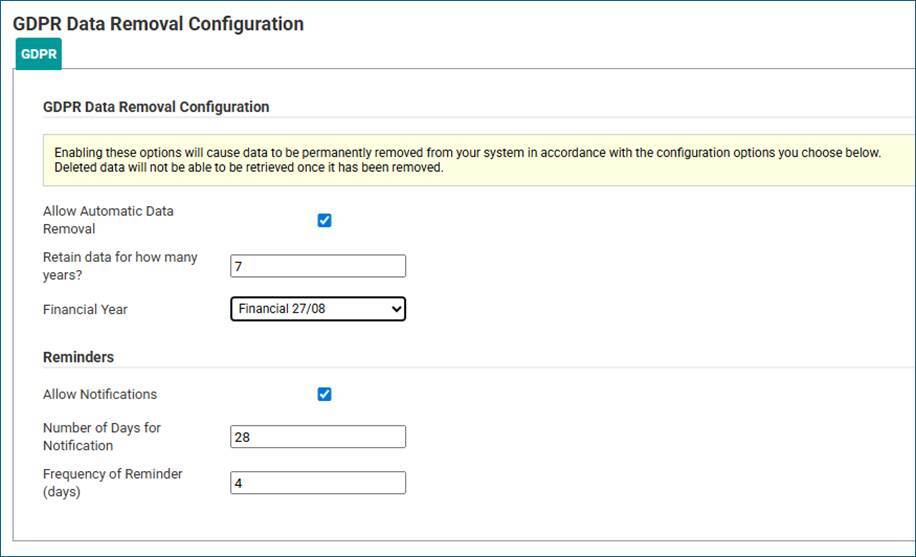
We've added a new option in the 'System Options' to allow you to configure the GDPR settings for your system.

These settings will allow older data to be removed from the system based on your financial year end and the retention period you specify. This ensures compliance with GDPR, keeping data no longer than is necessary. Noting that HMRC will currently require you to retain financial information for up to 7 years past the financial year end for audit purposes, but that after this period the information is able to be removed, there are checks built into the setting options to guide you.
Automatic removal of claim, receipts, employee, and driver compliance information
An automated scheduled process was implemented allowing the removal of outdated expenses claim data, receipts, employee records and driver compliance records for eligible accounts. Using the process, and following strict deletion rules already built into Expenses, paid claims older than the configured retention period will be permanently deleted from the system, along with related receipts and claimant data. The process also provides automatic removal of archived employee records in compliance with GDPR data retention policies whilst ensuring deletion only occurs for archived employees with a leaving date, no recent claims within the retention period, and after any relevant old claim data has been purged.
Specific system employees and key roles are excluded from deletion, including employees with critical roles such as budget holders, team leaders, claim owners, sign-off approvers, and line managers. These must be dealt with manually. Using the process also provides automatic removal of Driver Compliance records, in line with data retention policies, whilst ensuring records are deleted only if relevant claims and employee data have been removed, based on the financial year end and the data retention settings configured in the system. Driver compliance documentation records and associated images will be removed.
All deletions details will be logged for traceability and compliance.
Automatic removal of corporate card transactions information
The automated scheduled process has been extended to now include corporate card transactions, allowing the removal of outdated transactions that have been reconciled to expenses claims. We’ve added additional control checks for transactions reconciled against more than one claim, or where transactions are not fully reconciled, to ensure transactions and claims that do not meet the criteria for all scenarios are retained, preventing unwanted permanent deletion of data from the system.
Using the process, reconciled transactions and paid claims older than the configured retention period will be permanently deleted from the system, along with related receipts and claimant data. This will follow strict deletion rules already built into Expenses.
GDPR data retention and automatic data removal deletion log
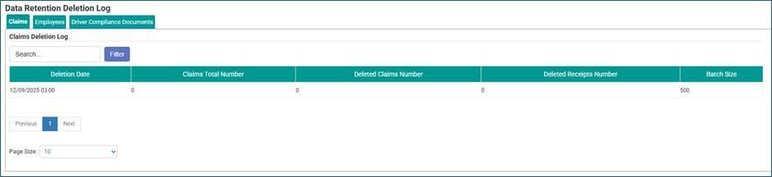
The "GDPR Data Removal Log" menu has been added under System Options, providing licensed users with the appropriate access role, the ability to view logs showing the automated data deletions.

The logs include summary statistics and deletion history for claims, employees, and driver compliance records allowing compliance tracking, but they do not include personal data for employees removed from the system.
Examples
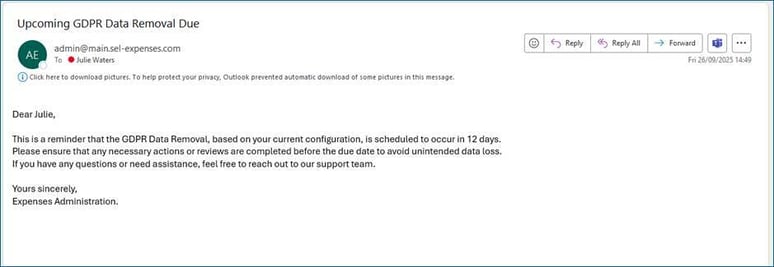
We’ve also included notifications as the data purge date approaches so that you can make any necessary checks in your system prior to the data being permanently removed. The notification will be sent to the main system administrator, and the frequency of the reminder is able to be configured in the Data Purge settings.

Account settings
Your account must be enabled for automatic data removal, and you must have the configuration settings configured in order to use this new process.
New standard driver compliance report - non-compliant drivers with no licence record
We’ve added a new standard report in the “Driver Compliance” category to report on drivers that have not recorded a driving licence in the system providing you with additional tools to manage driver compliance. This report allows you to now manage driver compliance for members of staff that drive on behalf of your organisation, but who do not claim mileage because they use one of your company vehicles.
Now you can request they complete the driver compliance checks in the system, fulfilling your Duty of Care requirements towards your drivers, and you can use this new report to ensure they have complied with the requirements to provide evidence of a valid driving licence. The report may be scheduled for your regular checking/alerting.
New standard driver compliance report - non-compliant drivers with expired licence record
We’ve also added a new standard report in the “Driver Compliance” category to report on drivers that have expired driving licence records in the system providing you with further additional tools to manage driver compliance. This report allows you to now manager driver compliance for members of staff that drive on behalf of your organisation, whether they claim or, do not claim mileage because they use one of your company vehicles. Now you have additional tools for fulfilling your Duty of Care requirements towards your drivers, and you can use this new report to ensure all drivers have complied with the requirements to provide evidence of a valid driving licence.
By running this report regularly, you can now proactively manage employees that do not have valid driving licence records, before they complete business mileage trips on behalf of your organisation. The report may be scheduled for your regular checking/alerting.
New standard driver compliance report - drivers with no licence penalty points
We’ve added a new standard report in the “Driver Compliance” category to report on drivers having more than 9 penalty points on their licence. This is to allow you to more proactively manage employees you request to drive on behalf of your organisation that may be at increased risk of losing their licence and alerting you prior to a potential event rather than after.
If the driver loses their licence they will be alerted upon trying to claim mileage, and the mileage claim will be prevented. The report may be scheduled for your regular checking/alerting.

Topline features proposed for the next 6 months.
We are excited to move forward into the first half of the next financial year that will bring further new features for the product.
There will be updates to the following areas of Expenses:

As always, your feedback is a crucial part of our progress, so please reach out with any suggestions or concerns you may have.
You may also log your ideas for Expenses into the portal, where other organisations will see the details and be able to vote to promote their relevance.
