
Assure Expenses
Highlights from the first half of the Financial Year
FY26 Q1 & Q2 Product Update
The first half of FY26 has been all about making Assure Expenses smarter, simpler, and more aligned with how you work. From expanding driver compliance tools to enhancing data management and claim accuracy, these updates reflect your feedback through our customer sessions and Ideas Portal.
Let’s take a look at what’s new!

Top highlights from Quarter 1 🌟
- Driver Compliance
- Record UK residence and UK expiry details for non-GB licences
- Additional reminders for expiry of non-GB licences based on UK residency
- Enhanced checking for drivers with a provisional licence
- Enhancements for driver compliance notifications
- Updated address and distance lookup service
Duty of Care Module / Driver Compliance Module
Our move to a modern microservices architecture has enhanced the Duty of Care module’s performance and scalability, giving us the foundation to release exciting new Driver Compliance features driven by your input and ideas.
- Record UK residency details and UK expiry date for non-GB driving licences
We’ve added a new feature to capture additional details for non-GB driving licences such as the UK date of residency and the UK expiry date. These fields are now available to allow the driver to enter their details for driving licence review. We’ve also made these fields reportable from the reports section. This improves driver compliance checking options since driving licence expiry and UK expiry dates can often be different on driving licences not issued through DVLA.
- Additional reminders for expiry of non-GB licences based on UK residency
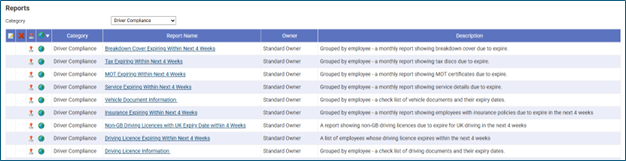
We’ve introduced new reminder functionality for non-GB driving licences, now based on the UK expiry date rather than the original country of issue. Because the UK expiry date can differ, and often occurs sooner, this enhancement ensures more accurate and timely compliance checks for your drivers. A new standard report is also available to help you stay ahead of expiries. It highlights all non-GB licences with a UK expiry date due to expire within the next four weeks and can be easily run or scheduled as needed. These new reminders and reports work alongside existing UK licence notifications to give you more complete oversight of driver compliance.
- Enhanced Checking for Provisional Licences
We’ve improved how the system identifies and manages provisional driving licences to strengthen compliance and reduce errors. The automatic DVLA lookup now flags any licence that contains only provisional entitlements as invalid, preventing learners from submitting mileage claims. This update helps ensure that only eligible drivers can claim mileage, improving accuracy and compliance without affecting other licence types or entitlement combinations.
- Improved Driver Compliance Email Notifications
Email notifications within Driver Compliance have been enhanced to provide clearer, more actionable information — changes inspired directly by your feedback. Each notification now includes the employee number for faster identification, along with reviewer comments when a document fails review. This gives recipients the context they need to resolve issues quickly, without having to log into the system.
These improvements make compliance reviews faster, more transparent, and easier to manage for both drivers and administrators.
Updated Address and Distance Lookup Service
The address and distance lookup service has been upgraded to the latest international GB Loqate Geocoding version. This behind-the-scenes enhancement ensures every mileage claim is supported by the most accurate and up-to-date location data. With improved precision in address matching, users can now rely on smoother, more accurate mileage calculations, helping to streamline the claims process and reduce potential errors.

Top highlights from Quarter 2 🌟
Over the course for Quarter 2 (Aug to Oct) we added some exciting new features and enhancements to Assure Expenses that came from your user ideas and suggestions.
The following new features and enhancements are now available:
- Data management and data retention tools
- Configuration of automatic data removal settings
- Automatic removal of claim information
- Automatic removal of employee information
- Automatic removal of driver compliance information
- Deletion logs
- Reminder notifications
- Enhancements for mileage claims that include passengers
- Enhancements to Claim Viewer
- Enhancements to Check and Pay Expenses
Data Management – Enhanced Data Retention Controls
Managing data effectively is key to maintaining compliance and minimising storage of unnecessary information. This quarter, we introduced powerful data retention tools that help you stay aligned with HMRC and GDPR requirements while simplifying system management. These new features allow you to automatically remove outdated expense and employee data once the mandatory audit period has passed, ensuring your system retains only what’s needed.
Your account must be enabled for automatic data removal in order to access this new set of features.
- Configuration of Automatic Data Removal
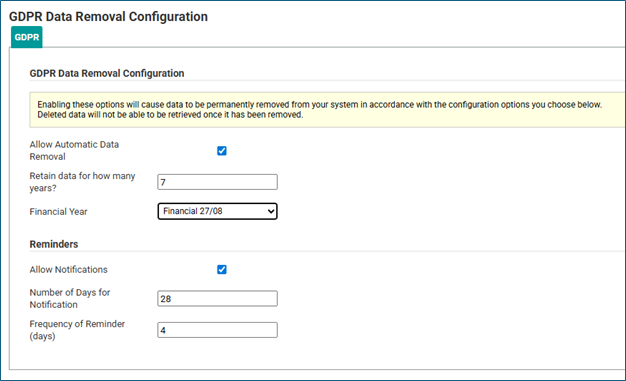
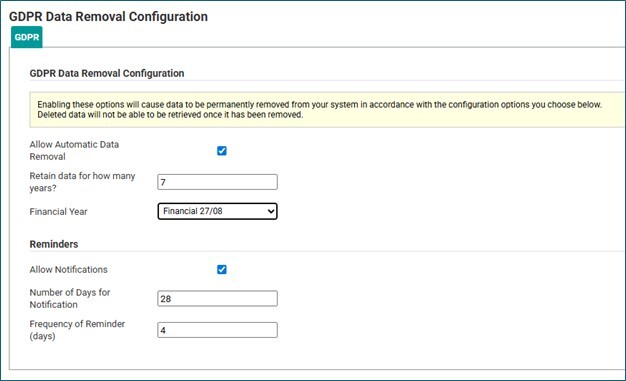
We've added a new option in the 'System Options' to allow you to configure the GDPR settings for your system.

These settings will allow older data to be removed from the system based on your financial year end and the retention period you specify, ensuring compliance with GDPR, keeping data no longer than is necessary.
Noting that HMRC will currently require you to retain financial information for up to 7 years past the financial year end for audit purposes, but that after this period the information is able to be removed, there are checks built into the setting options to guide you.
- Automatic Removal of Claim Information
A new automated process now makes it easier to manage outdated claim data while maintaining compliance and system efficiency.
Once enabled, this feature automatically deletes paid expense claims that are older than your configured retention period, along with their associated receipts and claimant details. The process follows the strict deletion rules already built into Assure Expenses, ensuring safe and compliant data handling.
Every deletion is securely logged to provide full traceability and support your organisation’s audit requirements.
- Automatic Removal of Employee Information
To support GDPR compliance and simplify data management, archived employee records can now be automatically removed to meet data retention policies.
The process ensures deletions occur only when all conditions are met — the employee has a confirmed leaving date, no recent claims within the retention period, and any related claim data has already been securely purged. Key system roles such as budget holders, team leaders, claim owners, approvers, and line managers are automatically excluded from deletion, ensuring business continuity and compliance. These records can be managed manually as required.
When deletion occurs, all associated employee data is removed in a controlled, traceable process, with detailed logs maintained for audit purposes.
Your account must be enabled for automatic data removal, and you must have the configuration settings configured in order to use this new process.
- Automatic Removal of Driver Compliance Information
Driver Compliance records can now be automatically deleted in line with your organisation’s data retention and compliance policies.
This automated process ensures that records are only removed once all related claims and employee data have been deleted, based on your configured retention settings and financial year end. When triggered, it securely removes all associated Driver Compliance documentation and uploaded images.
Every deletion is fully logged within the system, providing a clear audit trail for compliance and reporting purposes.
Your account must be enabled for automatic data removal, and you must have the configuration settings configured in order to use this new process.
- GDPR Data Retention and Automatic Data Removal Log
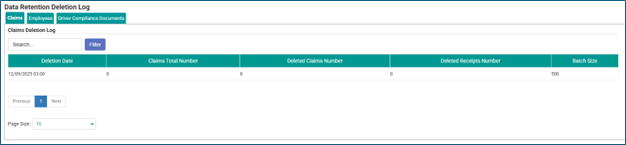
A new "GDPR Data Deletion Log" menu has been added under System Options, providing licensed users with the appropriate access role, the ability to view logs showing the automated data removals.
The logs include summary statistics and deletion history for claims, employees, and driver compliance records allowing compliance tracking, but they do not include personal data for employees removed from the system.

- GDPR data retention and automatic removal notifications
A new administrator notification now alerts the main system administrator whenever GDPR configuration settings are activated. This added visibility ensures transparency and oversight if another administrator makes changes to your data retention setup.
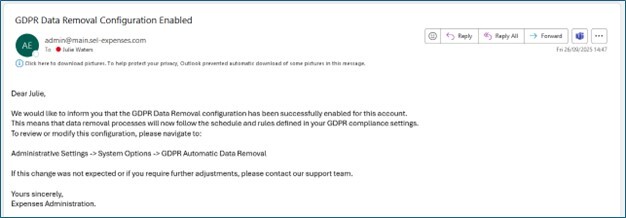
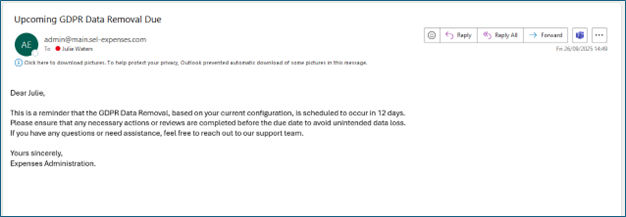
- New reminder notifications have also been introduced to keep the main system administrator informed when data is scheduled for automatic removal. These reminders are triggered based on your GDPR configuration settings and the frequency you’ve defined — ensuring you’re always aware of upcoming deletions.
Depending on your chosen settings, you may receive multiple reminders as data approaches its scheduled removal date, giving you ample time to review and prepare.
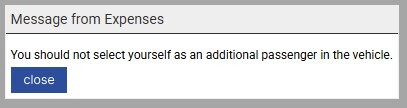
We’ve made enhancements for mileage claims to prevent a claimant from adding themselves as a passenger when they are already claiming the mileage for the journey step as a driver. This check occurs when the system is configured for entering passenger details by name.
Where a pence per mile (ppm) is reimbursed for the journey, and an additional ppm is paid for taking additional passengers on the same journey, this will help prevent the driver from claiming both for the same journey step, improving the accuracy of the claim and helping to prevent over-payments.
Enhancements to Claim Viewer Information
The Claim Viewer has been updated to make reviewing claims faster and more intuitive — an enhancement inspired directly by your feedback!
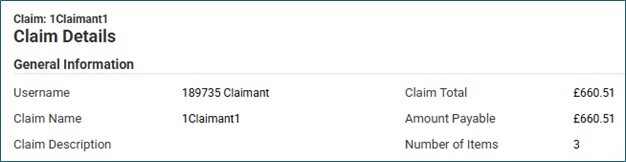
The claimant’s username now appears prominently at the top of the page, making it easy to identify who submitted the claim without needing to navigate elsewhere in the system.
This simple but impactful improvement streamlines the review process and helps approvers work more efficiently.
Enhancements to Check and Pay Expenses
Based on your requests, we’ve made enhancements to Check and Pay Expenses. Approvers can now see the claimant's username at the top of the Submitted Claim page in Check and Pay, making it easier to verify claim ownership and avoid confusion when reviewing claims.
.png?width=2000&height=250&name=Future%20(1).png "Future (1)")
We’re planning several new feature enhancements across Driver Compliance, User Experience, and Platform Modernisation, driven by your feedback and ideas:
Driver Compliance Enhancements
- Private vs. Company Vehicle Settings
New configuration options will allow you to exclude company cars from Driver Compliance checks — giving you more flexibility in managing compliance for private vehicles only. - Driver Compliance Top-Up Service
We’re streamlining the credit top-up process for licence lookups. New notifications for low, insufficient, or out-of-credit statuses will guide you to top up directly, reducing delays and simplifying the process.
Platform Modernisation & User Experience
- Updated Colour Branding & User Interface
We’re refreshing the Expenses platform with updated colour branding to align with RLDatix’s design standards.
This update will also introduce modernised UI components and accessibility improvements, ensuring a consistent, seamless experience across the RLDatix product suite.

As always, your feedback is a crucial part of our progress, so please reach out with any suggestions or concerns you may have.
You may also log your ideas for Expenses in the portal, where other organisations will see the detail and be able to vote to promote the relevance.